
As cyberattacks surge by 62% year-over-year and 79% of breaches target network perimeters (IBM Security 2024), properly configuring Cisco ASA with FirePower Services becomes critical for modern defense strategies. This technical walkthrough establishes foundational security controls while preparing infrastructure for advanced threat prevention.
Initial Hardware Preparation
Begin by validating hardware compatibility for FirePower Services:
- ASA 5500-X Series: Minimum 8GB RAM, 120GB SSD for threat logging
- Network Modules: Ensure compatibility with FirePower 2100/4100 series
- Licensing: Verify Threat Defense license (L-FPR-TD-1Y=) activation
Connect console cable to the ASA’s RJ-45 port (default 9600 baud) and initialize setup:
> enable
# configure terminal
(config)# hostname SECURE-FW01 Network Interface Configuration
Define secure zones with interface roles:
interface GigabitEthernet0/0
  nameif OUTSIDE
  security-level 0
  ip address 203.0.113.2 255.255.255.252
!
interface GigabitEthernet0/1
  nameif INSIDE
  security-level 100
ip address 10.1.1.1 255.255.255.0 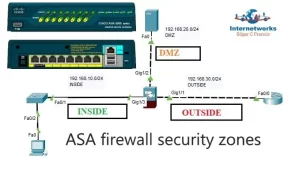
FirePower Services Integration
1. Bootstrap FirePower Module
Access ASA CLI to establish communication with FirePower module:
firepower module 1
  connect module
  > configure manager add 10.1.1.50 Secure123!
2. Initial FTD Configuration
Via FirePower Management Center (FMC) GUI:
- Navigate to Devices > Add Device
- Enter ASA’s management IP (10.1.1.1)
- Select Threat Defense deployment mode
- Configure NAT policies for management traffic
Core Security Policies
1. Stateful Inspection Baseline
access-list OUTSIDE_IN extended permit tcp any host 203.0.113.2 eq 443
access-group OUTSIDE_IN in interface OUTSIDE
2. Secure Management Plane
ssh 10.1.1.0 255.255.255.0 INSIDE
ssh version 2
aaa authentication ssh console LOCAL
3. FirePower Threat Defense
Deploy essential IPS policies via FMC:
- Policies > Access Control > New
- Enable Malware & Intrusion Prevention
- Apply Balanced Security and Connectivity preset
Verification & Testing
1. Connectivity Checks
# ping inside 10.1.1.100
# show asp drop
2. FirePower Status Validation
> show firepower
  Module 1: Up
  Threat Defense Version: 7.2.1
  License: Threat Defense
3. Security Policy Audit
Execute test attacks to verify IPS functionality:
nmap -sS 203.0.113.2 --script=http-sql-injection Performance Benchmarks
| Metric | ASA Base | ASA + FirePower |
|---|---|---|
| Throughput | 4.2 Gbps | 3.8 Gbps |
| SSL Inspection | N/A | 1.2 Gbps |
| Connection Rate | 35,000 CPS | 28,000 CPS |

Leave a comment