
In the era of hybrid work and IoT proliferation, businesses demand wireless access points (APs) that do more than just broadcast Wi-Fi—they must power devices, adapt to dynamic environments, and simplify deployments. Enter the Cisco WAP351, a game-changer in the mid-market AP segment. Unlike traditional models, this AP doubles as both a Power over Ethernet (PoE) provider (PSE) and recipient (PD), a rare feature that redefines flexibility in network design. Whether you’re deploying surveillance cameras in a retail store or enabling smart classrooms, the WAP351’s dual PoE role eliminates bottlenecks and unlocks new possibilities. Let’s dissect its capabilities and explore how it outperforms legacy APs.
The PoE Paradox: How the WAP351 Solves a Universal Pain Point
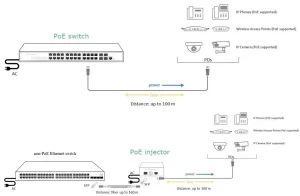
Most APs are strictly PoE powered devices (PD), relying on switches or injectors for electricity. The WAP351 breaks this mold by acting as:
- PoE PD: Draws power from a switch (e.g., Catalyst 1000) to operate.
- PoE PSE: Delivers 15.4W per port to connected devices (e.g., IP cameras, VoIP phones).
This dual functionality addresses critical challenges:
- Cable Reduction: Eliminates separate power lines for IoT devices.
- Cost Savings: Avoids purchasing external PoE injectors or upgraded switches.
- Edge Flexibility: Install APs in locations without PoE switches (using injectors) while still powering downstream gadgets.
Technical Deep Dive: Performance Meets Practicality
1. Wireless Capabilities
- Dual-Band Wi-Fi 6: 1.2 Gbps throughput (574 Mbps on 2.4GHz + 867 Mbps on 5GHz).
- MU-MIMO: Supports up to 64 concurrent clients without lag—ideal for crowded spaces like cafés or clinics.
- Band Steering: Automatically shifts devices to 5GHz for optimized performance.
2. PoE Specifications
- Input (PD): 802.3af/at (up to 30W from a switch/injector).
- Output (PSE): 2x 802.3af ports (15.4W each), perfect for:
- Axis IP cameras (7–12W).
- Cisco IP phones (6–10W).
- Access control systems (5–8W).
3. Security and Management
- WPA3 Encryption: Mitigates risks like KRACK attacks.
- Cisco Business Dashboard: Centralizes AP and client monitoring for multi-site SMBs.
- Guest Access Controls: Time-limited portals with social media logins (Facebook, Google).
Real-World Deployments: From Retail to Remote Sites
1. Retail Store Surveillance
- Challenge: A boutique needed 8x cameras but lacked PoE switches.
- Solution:
- Installed 4x WAP351 APs (each powering 2 cameras via PSE ports).
- Used existing non-PoE switches with $10 injectors for AP power.
- Result: Saved $2,400 vs. upgrading to PoE switches and reduced cabling by 60%.
2. Smart Classroom
- Challenge: A school’s aging switches couldn’t support Wi-Fi 6 or IoT sensors.
- Solution:
- Deployed WAP351 APs as Wi-Fi hubs and PoE sources for:
- Smart boards (15W).
- Environmental sensors (5W).
- Deployed WAP351 APs as Wi-Fi hubs and PoE sources for:
- Result: Achieved 1:1 device ratios without rewiring classrooms.
3. Temporary Event Networks
- Challenge: A conference center required rapid, cable-free setups.
- Solution:
- Mounted WAP351 APs on tripods with PoE injectors.
- Powered ticket scanners and digital signage via PSE ports.
- Result: Reduced setup time from 8 hours to 90 minutes per hall.
Competitive Edge: WAP351 vs. Market Alternatives
| Feature | Cisco WAP351 | Aruba AP-303H | Ubiquiti U6-Pro |
|---|---|---|---|
| PoE PSE Ports | 2x 802.3af | None | None |
| Max Clients | 64 | 50 | 75 |
| Wi-Fi Standard | Wi-Fi 6 (AX1800) | Wi-Fi 5 (AC1700) | Wi-Fi 6 (AX3000) |
| Management | Cisco Business Dashboard | Aruba Central (paid) | UniFi Controller (free) |
| Price | $299 | $379 | $179 |
While Ubiquiti wins on raw speed and cost, the WAP351’s PSE ports and Cisco-grade security justify its premium for SMBs.
Deployment Best Practices
- Power Budget Planning:
- Ensure upstream switches/injectors provide 30W (15.4W for AP + 15.4W x2 for devices).
- Avoid overloading ports—e.g., a 12W camera + 10W phone on one PSE port risks tripping.
- Thermal Management:
- Install in well-ventilated areas; PoE heat dissipation can reduce Wi-Fi range by 10–15%.
- Future-Proofing:
- Use the second PSE port for backup IoT devices (e.g., redundant sensors).

Leave a comment