
Introduction
This document provides troubleshooting flowcharts and step-by-step procedures for common faults that occur during NAT on a centralized network.
Prerequisites
This document applies to NE40E and ME60 series products running V800R010C00 or later.

Understanding Centralized NAT
NAT can be deployed in either centralized or distributed networking.
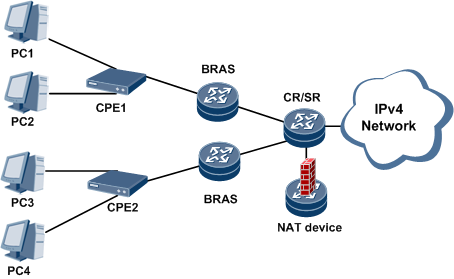
- Centralized NAT: is an early NAT deployment mode. In this mode, a standalone NAT device performs NAT and is attached to a core router (CR) or broadband remote access server (BRAS).
Figure 1-1 Centralized NAT networking
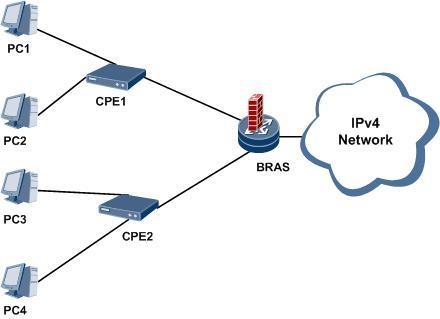
- Distributed NAT: In this mode, NAT-capable service boards are installed on devices (for example, BRASs) to perform NAT.
Figure 1-2 Distributed NAT networking
Centralized NAT Workflow
NAT can be performed in either forward (private to public network) or reverse (public to private network) direction.
Forward NAT:
After receiving a packet, a NAT device determines whether to perform forward NAT:
The device matches the user packet against an ACL:
If the packet matches the ACL, the device diverts the packet to the NAT service board.
If the packet does not match the ACL, the device forwards the packet according to the regular forwarding process.
The packet is diverted to the NAT service board bound to a NAT instance for translation.
When the first packet arrives at the NAT service board, the board selects a public IP address from an address pool bound to the NAT instance and a public port number from a port range bound to the instance. The public IP address and port number replace the existing source IP address and port number, respectively, in the user packet. Then, to perform NAT, the NAT board creates a session table and matches subsequent packets against the table.
After translation, the user packet is forwarded to the next hop according to the regular forwarding process.
Reverse NAT:
After receiving a packet, a NAT device determines whether to perform reverse NAT:
The device matches the user packet against a traffic diversion policy:
If the destination address in the packet matches a NAT address pool route contained in the FIB table, reverse NAT needs to be performed.
If the destination address in the packet matches a route of another type, the device forwards the packet according to the regular forwarding process.
The NAT device diverts the matching packet to a NAT service board.
The NAT service board performs reverse translation on the user packet based on a NAT mapping entry. The destination public IP address and port number in the user packet are replaced with private IP address and port number, respectively.
After reverse NAT is performed, the user packet is forwarded to the next hop according to the regular forwarding process.
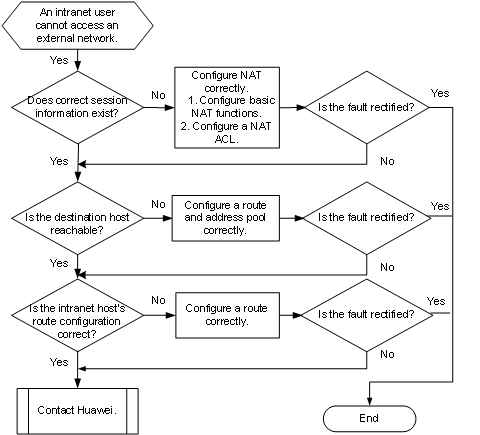
Troubleshooting Flowchart for Common Faults
Figure 1-3 NAT troubleshooting flowchart
Common Causes
- NAT service board resources are not allocated.
- The NAT configuration is incorrect, preventing NAT session creation.
- There is no route between the NAT gateway and external host.
- The ACL configuration is incorrect.
- An intranet host is unreachable from the NAT gateway.
- The application level gateway (ALG) function is disabled.
Troubleshooting Procedure
- Check that resources are allocated to the service board.
Run the display nat session-table size command to check information about session table resources allocated to each service board.
Table 1-1 Description of the display nat session-table size command output
|
Item |
Description |
|---|---|
|
TotalSize |
Total number of session table resources |
|
UsedSize |
Total number of used session table resources |
|
FreeSize |
Total number of idle session table resources |
|
SlotID |
Slot ID of a service board |
|
CurSessTblSize |
Number of existing session table resources of a CPU |
|
CfgSessTblSize |
Number of session table resources configured for a CPU |
|
ValidFlag |
Flag bit of the session table resources:
|
If no resources are allocated to the service board or NAT is disabled, reconfigure the function. For details, see “Configuring the NAT Session Table and Bandwidth Resources” in HUAWEI NE40E Router Configuration Guide – NAT and IPv6 Transition Technology.
2. Check that the NAT service has correct session or user information.
Run the display nat session table command to check that a correct session has been created for the NAT service.
- If the protocol type, IP address, or port number displayed is incorrect, check the NAT service configuration. If this configuration is incorrect, reconfigure the NAT service. For details about how to configure NAT services, see “NAT Basic Configuration” in HUAWEI NE40E Router Configuration Guide – NAT and IPv6 Transition Technology.
- If the protocol type, IP address, and port number in the session information are correct, go to Step 3.
- Run the display nat user-information command to check information about online NAT users.
If the IP address, port number, or session restriction displayed is incorrect, check the NAT service configuration. If this configuration is incorrect, reconfigure the NAT service. For details about how to configure NAT services, see “NAT Basic Configuration” in HUAWEI NE40E Router Configuration Guide – NAT and IPv6 Transition Technology.
If the IP address, port number, and session restriction in the user information are correct, go to Step 3.
3. Check whether the NAT device can reach the destination host on the external network.
Run the ping command to check reachability.
- If the ping fails, run the display ip routing-table command to view the current routing table. Check whether a correct route to the external network is configured on the device. If the route configuration is incorrect, determine whether to reconfigure the route:
Check whether the external network address to be accessed by the intranet user is on a different network segment than the external network interface of the NAT device, and there is no available route from the device to the address to be accessed. In this case, configure a static route on the gateway so that the intranet packets can be forwarded through the correct interface after being translated by the device.
If the external network address to be accessed by intranet users and the external network interface of the NAT device are on the same network segment, you do not need to configure a static route. - If the NAT device can ping the external host, go to Step 4.
4. Check that the route configuration of the intranet host is correct.
Run the display ip routing-table command to check whether a correct route is configured on the internal host so that packets sent to the external network can be forwarded to the NAT device. If the route configuration of the internal host is incorrect, reconfigure the route. Otherwise, go to Step 5.
5. Collect the following information and contact Huawei technical support:
- Execution result of the preceding steps
- Configuration file, log information, and alarm information of the NAT device








Leave a comment