

In today’s article we will mainly introduce Huawei SMU11B Site Monitoring Unit Network Management.
1. Management Through the NetEco
1.1 IP Networking
- Connect a network cable to the FE port on the SMU.Connecting a communications cable
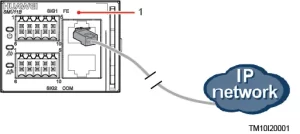
- Apply for a fixed IP address from the network administrator of the site or equipment room.
- Set the IP protocol version, IP address, subnet mask, and gateway address on the WebUI.
NOTE: If the IP address of the SMU11B is changed on the WebUI, record the IP address for future login.2.1 Management Through the NetEco
2.1 Logging In to the NetEco
- Enter https://NetEco IP address:port number for NetEco login (for example, https://10.10.10.1:31943) in the address box of the browser and press Enter to go to the NetEco login page.

- NetEco login page
- Enter the correct username and password and click Log In.
NOTE:To obtain the NetEco username and password, contact the network administrator of the site or equipment room.
2. Network Management (over SNMP)
2.1 Connecting a Communications Cable
Connect a network cable to the FE port on the SMU.
2.2 Setting Parameters
- Apply for a fixed IP address from the network administrator of the site or equipment room.
- On the WebUI, select an IP protocol version and set IP parameters.
IPv4 parameters
|
Path |
Parameter |
Default Value |
Setting |
|---|---|---|---|
|
System Settings > Network Parameters |
IP Address |
192.168.0.10 |
Set this parameter according to the address provided by the network administrator. |
|
Subnet Mask |
255.255.255.0 |
Set this parameter according to the subnet mask provided by the network administrator. |
|
|
Default Gateway |
192.168.0.1 |
Set this parameter according to the gateway address provided by the network administrator. |
IPv6 parameters
|
Path |
Parameter |
Default Value |
Setting |
|---|---|---|---|
|
System Settings > Network Parameters |
IP Address |
2001::2002 |
Set this parameter according to the address provided by the network administrator. a to f, A to F, 0 to 9, and .; (a maximum of 45 characters) |
|
Subnet Prefix Length |
64 |
1–128 |
|
|
Default Gateway |
2001::2001 |
Set this parameter according to the gateway address provided by the network administrator. a to f, A to F, 0 to 9, and .; (a maximum of 45 characters) |
2.3 Setting SNMP Parameters
Prerequisites:
NOTE: You can set SNMP parameters remotely or locally on the WebUI.
Before setting SNMP parameters, obtain the information listed in below table from the SNMP-based NMS.
Information obtained from the NMS:
|
Information |
Description |
|---|---|
|
SNMP Version |
SNMP version and port number used for communication between the SMU and the NMS. The SNMP version can be SNMPv1, SNMPv2c, or SNMPv3. |
|
SNMP Port Number |
|
|
Read Community Name |
If you use SNMPv1 or SNMPv2c, enter the read and write community names that comply with the NMS. Otherwise, the SMU will not connect to the NMS. The read community name must be different from the write community name. |
|
Write Community Name |
|
|
User Name |
To enhance the security, you need a username and password for authentication if you use SNMPv3. After the authentication succeeds, the SMU can communicate with the NMS. |
|
MD5/SHA Password |
|
|
DES/AES Password |
|
|
Trap Target Address |
IP address and port number used for reporting alarm trap packets |
|
Trap Port |
|
|
Trap Community |
If you use SNMPv1 or SNMPv2c, this parameter is the community name used for reporting alarm trap packets. |
NOTE:
The standard protocols SNMPv1 and SNMPv2c have security risks. You are advised to use SNMPv3.
The standard encryption algorithms MD5 and DES have security risks. You are advised to use the secure encryption algorithms SHA and AES.
2.4 Commissioning on the NMS
You can manage the power system on the NMS that is connected over SNMP. For details, see the related documents of the NMS.
If you have any questions, please feel free to contact: csd@telecomate.com







Leave a comment