
In the intricate dance of network management, two critical mechanisms often cause confusion even among seasoned IT professionals: Traffic Suppression and Storm Control. While both aim to prevent network meltdowns, their roles, triggers, and implementations differ profoundly. Misconfiguring these tools can mean the difference between a resilient network and a costly outage. This article demystifies their functions, explores real-world use cases, and provides actionable insights to help you safeguard uptime and performance.
The Silent Threats: Broadcast Storms and Rogue Traffic
Modern networks are battlegrounds. Rogue devices, misconfigured switches, or malicious actors can unleash torrents of unwanted traffic—whether broadcast floods, multicast loops, or malicious packets. Left unchecked, these events cripple bandwidth, crash applications, and trigger outages costing enterprises millions per hour.
Enter Traffic Suppression and Storm Control, two defense mechanisms often conflated but designed for distinct scenarios:
- Traffic Suppression: Targets specific traffic types (e.g., ARP, NetBIOS) to reduce noise.
- Storm Control: Monitors and mitigates sudden traffic surges across ports or VLANs.
Understanding their nuances is key to building a bulletproof network.
Traffic Suppression: Precision Filtering for Known Threats
Traffic suppression acts like a surgeon’s scalpel, selectively blocking or rate-limiting predetermined traffic patterns.
How It Works:
- Identify Targets: Common candidates include:
- Broadcast/Multicast: ARP storms, DHCP floods.
- Protocol-Specific: NetBIOS name resolution bursts.
- Legacy Protocols: IPX/SPX in outdated systems.
- Set Thresholds: Define maximum allowable rates (e.g., 1000 packets/sec).
- Action: Discard, throttle, or log offending traffic.
Case Study: A university network suppressed NetBIOS broadcasts from legacy lab equipment, reducing CPU load on core switches by 40%.
Configuration Snippet (Cisco IOS):
interface GigabitEthernet0/1
 storm-control broadcast level 50
 storm-control action shutdown
This shuts down the port if broadcast traffic exceeds 50% bandwidth.
Storm Control: The Emergency Floodgate
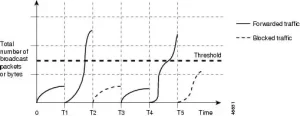
Storm control is the network’s panic button, activated when traffic volumes exceed defined thresholds—regardless of packet type.
Key Mechanisms:
- Rate Monitoring: Tracks bits/sec or packets/sec per port/VLAN.
- Threshold Types:
- Rising: Triggers when traffic surpasses a limit.
- Falling: Resumes normal operation when traffic drops below a lower limit.
- Mitigation Actions: Block traffic, disable ports, or trigger alerts.
Real-World Application:
A financial firm deployed storm control on trading floor switches after a misconfigured server flooded the network with 10Gbps of TCP SYN packets. Storm control:
- Detected the anomaly in <1 second.
- Isolated the port, preventing a $5M trading halt.
Infographic: Side-by-side workflow of Traffic Suppression (targeted protocol blocking) and Storm Control (port-level surge mitigation).
When to Use Each Tool: A Decision Matrix
| Scenario | Traffic Suppression | Storm Control |
|---|---|---|
| Known Problematic Protocols | Yes (e.g., NetBIOS) | No |
| Sudden Traffic Surges | No | Yes (e.g., DDoS, loops) |
| Granular Control | Protocol/port level | Port/VLAN level |
| Preventative Measure | Yes | Yes (reactive & proactive) |
Example:
- Suppression: Blocking IPv6 multicast in an IPv4-only warehouse network.
- Storm Control: Containing a TikTok live-stream event that accidentally saturated a campus VLAN.
Common Pitfalls and Best Practices
Mistake #1: Over-Suppression
Aggressively blocking legitimate traffic (e.g., ARP) can break applications.
Fix: Use storm-control for surges and suppress only non-essential protocols.
Mistake #2: Ignoring Asymmetric Traffic
Storm control monitors ingress traffic only. Outbound floods require additional measures.
Fix: Combine with egress ACLs or QoS policies.
Mistake #3: Static Thresholds
Networks evolve. Yesterday’s thresholds may choke today’s traffic.
Fix: Use AI-driven tools like Cisco DNA Center to auto-adjust limits.
Vendor-Specific Nuances
- Cisco:
storm-controlvs.broadcast-suppressioncommands. - Juniper:
storm-controlprofiles with hierarchical rate limits. - Aruba: Per-port thresholds with dynamic learning modes.
Pro Tip: Always test configurations in a lab. A misapplied storm-control action can take down entire subnets.
The Future: AI and Predictive Traffic Management
Emerging solutions are blending suppression and storm control with machine learning:
- Anomaly Prediction: Anticipate surges 10 minutes before they occur.
- Auto-Suppression: Dynamically block zero-day attack patterns.
- Self-Healing: Auto-rollback configurations causing false positives.
Traffic suppression and storm control are not rivals but allies in the quest for network stability. Suppression offers precision against known disruptions, while storm control serves as a safety net against the unpredictable. Together, they form a layered defense strategy that adapts to both routine and extraordinary threats.
For network architects, the lesson is clear: Master these tools, tailor them to your environment, and vigilantly refine their parameters. In doing so, you transform your network from a fragile web of devices into a resilient, self-regulating ecosystem capable of weathering any storm—literal or digital.







Leave a comment