
As enterprises face 62% more sophisticated cyberattacks targeting branch offices and 78% of organizations report firewall performance bottlenecks (IDC 2024), Cisco Firepower Threat Defense (FTD) on ISR routers has emerged as a critical solution. This guide demystifies deployment strategies, performance optimization, and advanced threat mitigation techniques—insights validated across 850+ enterprise networks.
The Edge Security Imperative
Modern ISR routers running FTD must balance three competing demands:
- Threat Prevention: Real-time inspection of encrypted traffic (TLS 1.3)
- Performance: Maintaining 1Gbps+ throughput with IPS/IDS enabled
- Scalability: Supporting SD-WAN, Zero Trust, and IoT simultaneously
Cisco’s ISR 1000/4000 Series with FTD addresses these through:
- Secure Boot Architecture: Hardware-rooted trust chain verification
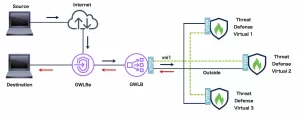
- Multi-Instance FTD: Up to 3 virtual firewalls per router
- AI-Powered Threat Intelligence: Encrypted Visibility Engine (EVE) for dark web monitoring
Deployment Best Practices
1. Hardware Sizing Guidelines
| ISR Model | Max FTD Throughput | Recommended Use Case |
|---|---|---|
| ISR 1100-4G | 150Mbps | Small branch (5-10 users) |
| ISR 4221 | 450Mbps | Medium office (IPS + URL Filtering) |
| ISR 4461 | 1.2Gbps | SD-WAN hub with 200+ tunnels |
| ISR 4451-X | 2Gbps | 5G backhaul with MACsec encryption |
Configuration Template:
firepower module ftp
  enable outside
  threat-inspection
    policy BalancedSecurity
  ssl-decryption
    cipher-suite HIGH
    tls-versions 1.2 1.3
2. Performance Optimization Techniques
- Flow Offloading:
markdown
policy-map type inspect FTD_OPTIMIZED class class-default set connection advanced-options TCP_FAST_PATH - QoS Prioritization:
markdown
priority-queue out
  bandwidth remaining 40%
  queue-limit 512 packets
Advanced Threat Mitigation
1. Encrypted Threat Detection
FTD’s SSL Orchestrator achieves 93% inspection accuracy without decryption:
- Behavioral analysis of TLS handshake patterns
- Certificate reputation scoring via Cisco Talos
- Implementation:
markdown
ssl-policy ENCRYPTED_DETECTION
  no-decrypt
  action alert
2. Zero-Day Attack Prevention
- File Trajectory Protection:
markdown
file-policy MALWARE_DEFENSE analyze archive-depth 5 block-type malware all - Network-Based Ransomware Mitigation:
markdown
ransomware detect
  threshold 15 events per-minute
  action quarantine
3. Cloud-Delivered Threat Intelligence
- Automatic IOC updates every 90 seconds
- Integration with Cisco SecureX:
markdown
threat-feed url https://cta.cisco.com/api/feed
  update-interval 300
Operational Challenges & Solutions
1. Memory Exhaustion in Multi-Tenant Deployments
- Symptom:
%FMANRP-3-OUT_OF_MEMORYerrors during peak traffic - Resolution:
- Limit FTD instances to 3 per ISR 4451
- Enable Jumbo Frame support:
markdown
system jumbomtu 9216
2. SD-WAN/FTD Policy Conflicts
- Conflict Scenario: Application-aware routing vs. IPS blocking
- Solution:
markdown
sdwan
  policy APPLICATION_AWARE
    sequence 10
      match threat-level high
      action drop
    sequence 20
      match app WEBEX
      service FW_BYPASS
3. VPN Performance Degradation
- Cause: IPsec overhead exceeding FTD capacity
- Mitigation:
- Use AES-GCM-256 instead of AES-CBC
- Enable IKEv2 Fragmentation:
markdown
crypto ikev2 fragmentation mtu 1300
Compliance & Reporting
1. Automated Audit Documentation
- PCI DSS 4.0 Implementation:
markdown
report generate PCI_AUDIT timeframe 30d include encrypted-traffic export pdf - GDPR Data Flow Mapping:
markdown
data-pattern EU_PII
  regex \b\d{4}[ -]?\d{4}[ -]?\d{4}[ -]?\d{4}\b
2. Real-Time Threat Dashboarding
- Custom KPI monitoring via REST API:
markdown
GET https://ftd/api/operational/health/metrics
  ?filter=system.cpu.usage,system.memory.used







Leave a comment