

In the practical application of Huawei switches, correctly activating the license file is crucial to ensuring the device operates with full functionality and stability. However, during the activation process, customers may encounter failures due to issues such as file format, version mismatch, or device information verification. This article provides a detailed summary of common causes and corresponding solutions to help you efficiently troubleshoot and resolve such problems.
I. Possible Causes for License Activation Failure:
- The license file is invalid.
- The specified license file does not exist.
- The license file has expired.
- The license file does not match the system software version.
- The device’s ESN does not match the ESN associated with the license file.
II. Solutions:
- If the device displays: “Error: The filename is invalid, and the postfix of the file name must be ‘dat’.”
- Cause: The file extension of the license to be activated is invalid. The license file must have a “.dat” extension.
- Solution: Confirm and activate the correct license file with the proper “.dat” extension.
- If the device displays: “Error: The specified file does not exist or is illegal.”
- Cause: The specified license file does not exist or the entered filename is incorrect.
- Solution: Verify that the license file exists in the device storage path and that the filename entered is correct.
- If the device displays: “Info: License File expired.”
- Cause: The license file has expired.
- Solution: Reapply for or purchase a new license file and activate it promptly.
- If the device displays: “Info: License file validation failed.”
- Cause: License file validation failed, possibly due to file corruption or errors during the application process.
- Solution: Reapply for or purchase a new license file.
- If the device displays: “No product features present in LK”
- Cause: The license file does not match the device’s product information.
- Solution: Reapply for a license file that matches the device model and required features.
- If the device displays: “Info: License File with ESN or Version mismatch cannot be activated repetitively.”
- Cause: A license file with ESN or version mismatch has already been activated once and cannot be activated again.
- Solution: Reapply for or purchase a license file that matches the device ESN and system version.
III. Real Case: Successful Activation with Remote Technical Support
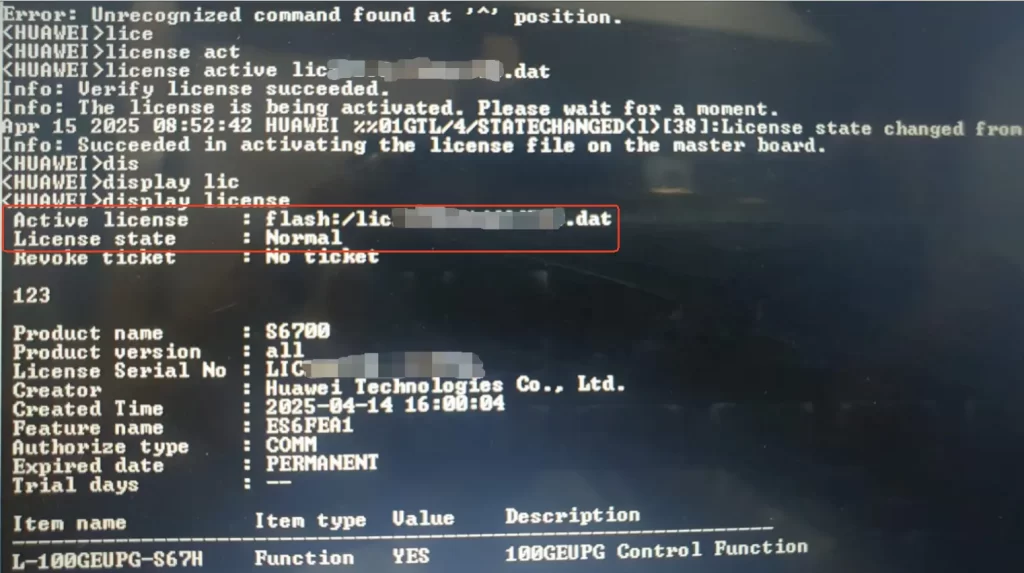
Recently, one of our clients in Egypt had repeated problems activating the license for Huawei S6730-H24X6C. With the remote guidance of our technical support team, the customer verified the ESN of the device and successfully loaded the license.
The following image shows the final activation result on the device interface:
Additional Recommendations: If you are still unable to activate the license successfully after following the above steps, please contact our technical experts for assistance at csd@telecomate.com.







Leave a comment