

Introduction: The Central Office Challenge
As a Senior Network Architect who has deployed thousands of Optical Line Terminal (OLT) units across Tier-1 ISPs and enterprise networks, I have witnessed the evolution from legacy ATM-based systems to the high-density, distributed architectures of today. The Huawei SmartAX MA5800 series represents a paradigm shift in access network engineering . However, the sheer depth of its configuration options—from GPON and XGS-PON to 10GE uplinks—often creates operational bottlenecks for engineers . This manual is not merely a list of commands; it is a deep-dive, enterprise-grade configuration blueprint designed to eliminate guesswork, optimize resource allocation, and ensure carrier-grade reliability. We will navigate the CLI with the precision required to achieve sub-millisecond latency and flawless Quality of Service (QoS) across thousands of subscribers.

Core Architecture & Hardware Topology
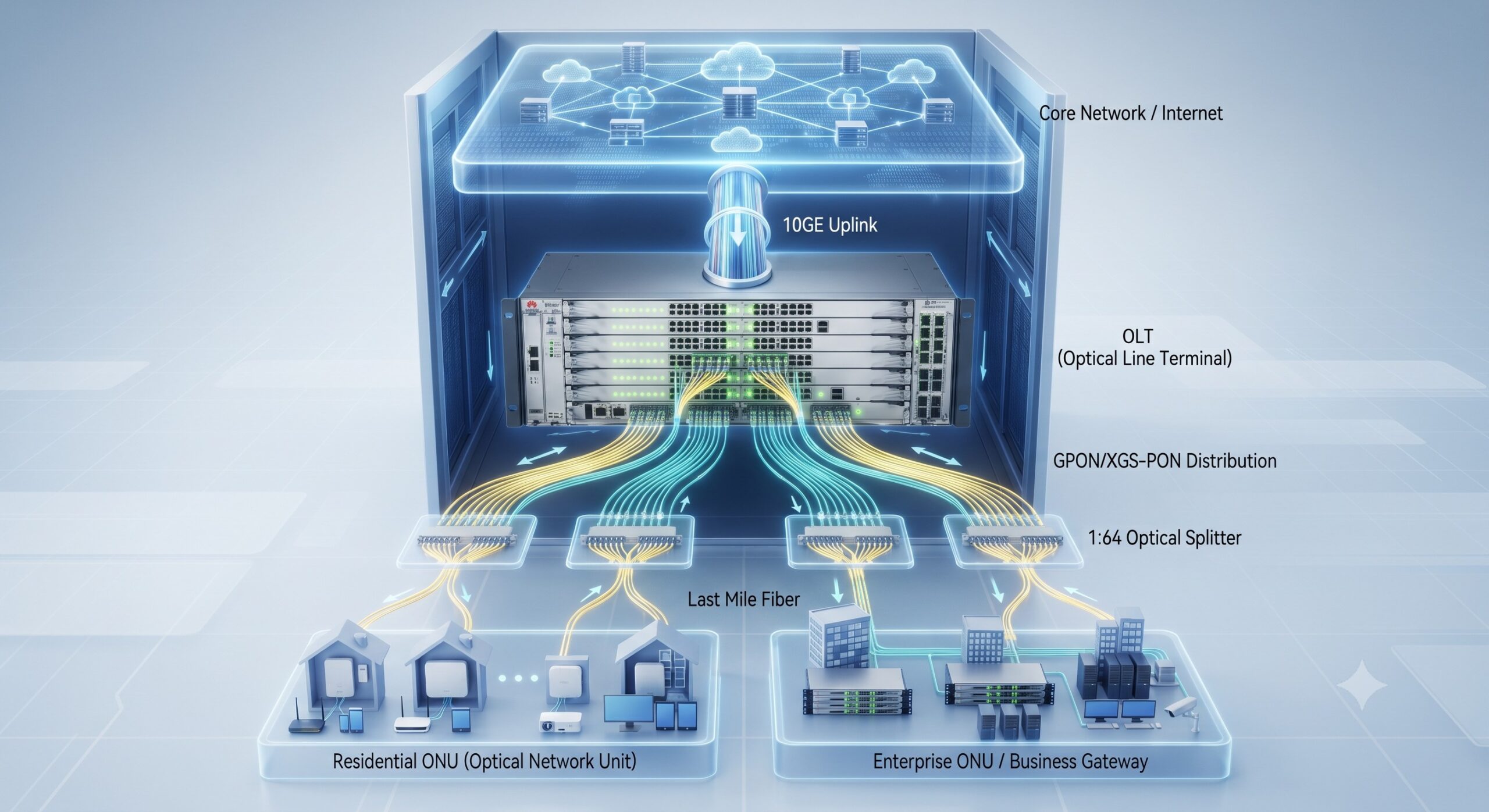
Before executing a single command, we must understand the underlying silicon. The MA5800 series—comprising the X17, X15, X7, and X2 chassis—utilizes a distributed switching architecture . Unlike centralized systems, the MA5800 integrates the switching fabric onto the control boards, allowing for near-line-rate forwarding. The Internal ASIC (Application-Specific Integrated Circuit) handles packet processing for GPON, XG-PON, and XGS-PON protocols natively .
Addressing the Physical Layer
Physical prerequisites are often overlooked, leading to configuration failures. The MA5800 supports a variety of interface boards, generally categorized by the PON technology they support. Proper configuration begins with verifying the board presence and laser state. Before adding an ONT, we must ensure the PON port is active and ready to accept authentication.
- Initial Board Verification:
display board 0—This verifies the hardware is physically recognized by the backplane . - Port Initialization:
interface gpon 0/1followed byport 0 laser-onensures the optical signal is active . - Auto-Discovery: For rapid deployment,
ont-auto-find enabletriggers the OLT to listen for unregistered ONUs. This is crucial for field technicians who may not know the specific MAC or SN initially .
Enterprise VLAN Architecture & Traffic Segmentation
In a modern FTTx network, the VLAN framework dictates the security and operational efficiency of the entire service delivery chain. A common bottleneck arises from misconfigured VLAN attributes, specifically the use of Smart versus MUX VLANs . For enterprise scenarios—where inter-subscriber communication is often prohibited—the Smart VLAN is the industry standard. It allows upstream communication while isolating downstream service ports.
| Configuration Component | Key Parameters | Enterprise Best Practice |
|---|---|---|
| VLAN Framework | Type: Smart / MUX / QinQ Attribute: Common / Stacking |
Use Smart VLANs for Internet access to prevent subscriber-side broadcast storms . |
| DBA Profile | Type3 (Assured) / Type4 (Max) Assure Bandwidth (kbps) |
Assign Type3 for enterprise voice SLAs; Type4 for best-effort residential data . |
| GPON Line Profile | T-CONT ID GEM Port Mapping Mapping Mode (Port/VLAN) |
Map GEM ports to T-CONTs to enforce QoS. Use VLAN mapping mode for multi-service differentiation . |
| Service Port Binding | VLAN ID Gemport ID Tag-Transform (Translate/Raw) |
Use ‘translate’ to swap VLANs at the OLT for seamless service handoff to the core network . |
| OMCI Management | ONU WAN IP Index Policy-Route-Profile |
Bind specific ONU LAN ports to specific WAN connections to ensure router-based traffic segregation . |
Step-by-Step VLAN Implementation
We will follow a systematic approach. First, we define the VLAN type. For instance, to create a management VLAN (VLAN 400) and a data VLAN (VLAN 100) :
- Create VLAN:
vlan 100 smartandvlan 400 smart. If dealing with legacy stacking (QinQ), we assign theQinQattribute:vlan attrib 100 q-in-q. - Uplink Configuration: The uplink port (e.g., 0/19/0) handles the aggregated traffic. We set the link-type to
trunkand permit the necessary VLANs to pass to the core network:port trunk permit vlan 100 400. - IP Interfaces: While the hardware handles forwarding, the management domain requires a Layer 3 interface. For remote management, we configure the VLANIF interface:
interface vlanif 400with an IP address to establish connectivity .
DBA Profiles, GPON Templates, and ONU Provisioning
Dynamic Bandwidth Assignment (DBA) is the engine of the PON network. It dictates how upstream bandwidth is allocated to each Optical Network Unit (ONU) . Setting the correct DBA Profile prevents upstream congestion (bottlenecks) during peak usage. For mission-critical enterprise voice or video, we utilize the Type3 or Type4 profiles to guarantee bandwidth .
Configuration Logic Flow
The provisioning sequence follows a strict hierarchy:
- DBA Profile:
dba-profile add profile-id 10 profile-name 100M type3 assure 102400 max 204800. - GPON Line Profile: This defines the mapping between GEM (GPON Encapsulation Method) ports and the T-CONTs (Transmission Containers). We map the DBA profile to the TCONT and then create GEM ports to map to the specific VLAN .
Example:tcont 1 dba-profile-id 10thengem add 1 eth tcont 1. - Service Profile: This handles Layer 2 bridging and VLAN translation. For transparent transmission, we use
user-bridging enable. - ONU Authentication: Here we link the hardware to the service. Using
ont addwithsn-auth(Serial Number Authentication) ormac-auth.
Advanced Services: IPv6 Integration and OMCI Management
As IPv4 exhaustion intensifies, configuring Native IPv6 on the MA5800 is no longer optional. The OLT acts as a bridge and a DHCPv6 relay agent . Configuration involves enabling IPv6 on the VLAN interface and setting Router Advertisements (RA) flags. Commands such as ipv6 nd autoconfig managed-address-flag allow the ONU to request DHCPv6 addresses for its downstream CPEs .
Furthermore, the OMCI (ONT Management and Control Interface) is the protocol used by the OLT to manage the ONU features, such as WAN ports and NAT configuration. Enterprise deployments often require fine-tuning of the ONU’s routing table. Using ont policy-route-profile allows us to bind specific LAN ports to specific WAN IP indexes, enabling precise traffic steering .
Network Management Integration (SNMP & U2000)
While CLI is the backbone of immediate troubleshooting, operational efficiency requires integration with Network Management Systems (NMS). The Huawei U2000 is a standard tool for managing thousands of nodes . For integration, we must properly configure the SNMP (Simple Network Management Protocol) agent on the OLT. The configuration involves setting snmp-agent community read public and write private to allow read/write access for the NMS. Furthermore, establishing the correct ip route-static ensures that the management interface (meth 0) can reach the U2000 server across the out-of-band network .
Conclusion: From Configuration to Optimization
The Huawei MA5800 is a high-density, carrier-grade beast . The difference between a functioning network and a highly optimized, revenue-generating network lies in the adherence to configuration hierarchies—from the physical laser enabling, through the logical VLAN segmentation and Smart VLAN isolation, to the precise mapping of DBA bandwidth profiles to GEM ports . Network engineers must treat configuration as a holistic architecture, not just a sequence of commands. By implementing the standards discussed—leveraging Smart VLANs for security, Type3 DBA profiles for guaranteed throughput, and OMCI for end-to-end CPE management—enterprises can fully harness the terabit forwarding capacity of the MA5800, ensuring a reliable, low-latency foundation for FTTH/FTTx services .

Leave a comment