
you’re knee-deep in cables, managing a closet full of standalone cisco switch units. Each box needs individual power, cooling, configuration backups, software updates, and troubleshooting. The chaos eats your time and bloats operational costs. Now, contrast that with stacking. By physically and logically linking multiple compatible cisco switch stack units using high-speed StackWise cables, you transform that scattered mess into a unified, manageable powerhouse. For network pros drowning in complexity, skipping this move isn’t just inconvenient—it’s a strategic blunder that sacrifices scalability, resiliency, and control. Whether you’re expanding a branch office or hardening a core data center, stacking turns fragmentation into cohesion, letting you add ports or capacity without multiplying management headaches. It’s the smart play for trimming costs while boosting reliability.
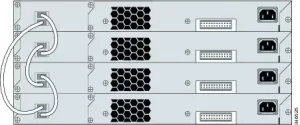
So, how exactly does consolidating into a cisco switch stack skyrocket efficiency? Start with the hardware prep. Cisco’s StackWise tech uses special cables (like StackWise-480G or StackWise-320) linking dedicated rear ports to form a high-bandwidth ring topology—think of it as a digital superhighway connecting every unit. Once connected, the magic happens during bootup: switches auto-negotiate roles via master election algorithms. The elected StackMaster assumes control while others become member switches. You manage this entire cluster using a single IP address—no more logging into five separate devices. Configuration becomes effortless: a VLAN created on the master instantly propagates to all members globally. Need more ports? Slide a new switch into the stack, connect StackWise cables, and it auto-discovers and inherits the master’s config. Zero-touch provisioning slashes deployment time. The resiliency gains are critical too. If a member switch fails, the ring topology self-heals traffic routing within milliseconds. Power supplies often share load across units—redundant power isn’t box-by-box but stack-wide. Performance scales intelligently: switches utilize distributed forwarding tables, enabling sub-microsecond latency cross-stack, and stacking maximizes Layer 3 routing capacity by pooling hardware resources across all members. Suddenly, your single logical switch handles 128 active VLANs or 48 routed interfaces—unthinkable with standalone units. Stacking also simplifies operations. Software upgrades occur in Hitless Upgrade mode: the master syncs firmware to members, reloads them sequentially, and traffic reroutes smoothly during reboots. Stack-wide Cisco Unified Access policies eliminate redundant QoS, ACL, or UDLD configs per switch. Troubleshooting shrinks to one CLI view instead of scattered logs. Network admins save 70% of deployment/maintenance hours while cutting human error risk drastically.
The bottom line? Implementing a cisco switch stack isn’t just about cable management—it’s your express lane to leaner, meaner networking. Ditching the standalone clutter consolidates physical footprint, minimizes energy consumption, and centralizes risk mitigation. Scaling becomes frictionless: add or replace units without re-cabling access ports or rewriting ACLs. Uptime becomes intrinsic—switch failures trigger automatic failovers instead of hours-long outages. You gain enterprise-grade 10G port density without premium chassis costs. Most importantly, operational efficiency compounds: fewer CLI sessions, fewer config versions, fewer monitoring dashboards. The hours saved managing one logical entity—versus a fragmented herd—translate directly into faster innovation cycles and ironclad reliability for users. Ignoring stacking chains you to yesterday’s complexity. Embrace it, and watch your network transform from fragmented burden to streamlined powerhouse—proving that consolidation isn’t just about saving space; it’s about reclaiming control and future-proofing growth, one stacked unit at a time.





Leave a comment