
In high-stakes network environments, downtime isn’t an option—it’s a crisis. Cisco’s Stack Power feature, a hallmark of the Catalyst 3750-X series, was designed to eliminate single points of failure by pooling power resources across stacked switches. However, even this robust system can falter due to misconfigurations, aging hardware, or environmental factors. For IT teams tasked with maintaining mission-critical operations, mastering Stack Power troubleshooting isn’t just a skill; it’s a necessity. Let’s unpack the most common pitfalls and proven strategies to keep your power-sharing infrastructure running flawlessly.
Diagnosing Stack Power Failures: Where to Start
When a Stack Power issue arises, symptoms often manifest as:
- Unexpected switch reboots within the stack
- Inconsistent power allocation (e.g., one switch drawing more power than others)
- Syslog alerts like “%STACKPOWER-4-PSR_MISMATCH” or “%STACKPOWER-3-POWER_DENIED”
Begin troubleshooting with these steps:
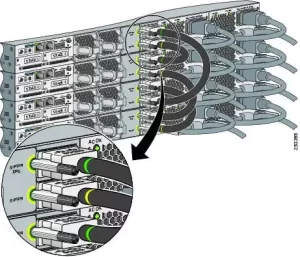
- Verify Stack Power Cable Integrity: Damaged or loosely connected cables are the leading cause of failures. Inspect for bent pins, frayed insulation, or corrosion.
- Check Power Supply Health: Use the
show power inlinecommand to confirm all power supplies (PSUs) are operational and delivering rated wattage. - Validate Firmware Compatibility: Mismatched IOS versions across switches can disrupt Stack Power negotiation. Ensure all switches run the same firmware (15.0(2)SE5 or later).
Solving the “Power Denied” Conundrum
The dreaded “POWER_DENIED” error typically stems from:
- Overloaded Power Budget: Each 3750-X switch supports up to 2x 715W or 1100W PSUs. If the total power demand exceeds the stack’s pooled capacity, lower-priority switches are shut down.
- Fix: Use
show stack-powerto view power usage. Reduce PoE load by deprioritizing non-critical devices (e.g., IP phones) viapower inline priority low.
- Fix: Use
- Inconsistent PSU Types: Mixing 715W and 1100W PSUs in the same stack triggers incompatibility alerts.
- Fix: Standardize PSU models across all stack members.
Addressing “PSR_MISMATCH” and Power Sharing Imbalances
A “PSR_MISMATCH” (Power Supply Rating Mismatch) alert indicates that one or more switches have PSUs with differing wattages or efficiency ratings. For example, pairing a 715W AC PSU with a 1100W DC model disrupts power sharing.
Resolution Workflow:
- Audit PSUs: Run
show environment poweron each switch to list installed PSUs. - Rebalance the Stack: Physically reposition switches with matching PSUs adjacent to each other in the stack.
- Adjust Power Allocation: Use
stack-power stack [name] power-share-priority [1-15]to prioritize switches supporting critical workloads.
When Hardware Aging Strikes: Proactive Maintenance
After 5+ years of service, 3750-X PSUs often exhibit degraded performance. Signs include:
- Fluctuating fan speeds (audible via irregular noise)
- Gradual PoE capacity reduction (e.g., fewer powered devices supported)
- Increased thermal output (check with
show environment temperature)
Mitigation Strategies:
- Load Testing: Use a PoE load bank to stress-test PSUs annually. Replace units showing >10% wattage drop.
- Thermal Management: Ensure stack switches are spaced 1U apart in racks to prevent overheating.
- Firmware Updates: Cisco’s Release 15.2(7)E1 introduced critical Stack Power stability patches for aging hardware.
Avoiding Configuration Pitfalls: Lessons from the Field
A 2023 case study at a manufacturing plant revealed how a misconfigured Stack Power policy caused intermittent outages:
- Mistake: Assigning equal
power-share-priorityvalues to all switches. - Result: During peak PoE demand (e.g., security cameras at shift changes), the stack couldn’t prioritize switches powering assembly-line robots.
- Solution: Implement a tiered priority system:
- Priority 15: Switches supporting robotics and SCADA systems
- Priority 5: Switches handling lighting and HVAC
- Priority 1: Non-essential peripherals
The Role of Monitoring Tools
Leverage these tools for preemptive Stack Power health checks:
- Cisco Prime Infrastructure: Track real-time power utilization trends and set thresholds for alerts.
- SNMP Traps: Configure traps for OID 1.3.6.1.4.1.9.9.826 (CISCO-STACKPOWER-MIB) to detect early warning signs.
- EEM Scripts: Deploy Embedded Event Manager scripts to automatically throttle PoE ports during overloads.







Leave a comment