
In the high-stakes world of data storage, where a single power outage can erase millions of dollars’ worth of transactions or research, RAID cache batteries play a critical yet often overlooked role. These compact power backups ensure that even during sudden failures, your cached data isn’t lost—protecting businesses from catastrophic downtime and data corruption. But how exactly do they work, and why are they indispensable for industries like finance, healthcare, and cloud services? This article demystifies RAID cache batteries, their technical nuances, and how they safeguard your most valuable digital assets.
The Fragility of Cached Data: Why Power Matters
Modern storage systems rely on RAID controllers to optimize performance by temporarily storing data in a cache—a high-speed memory buffer. This cache accelerates write operations, allowing servers to acknowledge data receipt before it’s fully written to disks. However, if power fails mid-transaction, this cached data vanishes, potentially corrupting files or databases.
Enter the RAID cache battery (officially termed a BBU or Battery Backup Unit). This component acts as a safety net, providing enough power to flush cached data to permanent storage during outages. For industries handling real-time transactions (e.g., stock trading platforms) or sensitive records (e.g., EHR systems), BBUs are non-negotiable.
How RAID Cache Batteries Work: A Technical Breakdown
RAID cache batteries operate through a meticulously orchestrated process:
- Power Failure Detection: The BBU constantly monitors the system’s power supply. When an outage occurs, it triggers within milliseconds.
- Cache Preservation: The battery powers the RAID controller’s cache memory, preventing data loss.
- Data Flushing: Within the battery’s runtime (typically 72+ hours), the controller writes all cached data to disks.
- Self-Testing & Alerts: Modern BBUs perform regular self-tests and notify admins of low charge or defects.
Key Components:
- Lithium-Ion Cells: Provide high energy density and long lifespan (3–5 years).
- Supercapacitors: Used in some BBUs for near-instantaneous charge/discharge cycles.
- Firmware: Manages power thresholds and integrates with RAID management software.
RAID Cache Battery vs. Supercapacitors: Choosing the Right Backup
While both serve similar purposes, their use cases differ:
| Feature | Battery (BBU) | Supercapacitor |
|---|---|---|
| Runtime | Hours to days | Seconds to minutes |
| Lifespan | 3–5 years | 10+ years |
| Ideal For | Long outages, large caches | Short outages, low latency |
| Maintenance | Periodic replacement | Minimal |
Example: A hospital’s SAN storing patient records might use BBUs to endure prolonged outages, while a stock exchange’s HFT system opts for supercapacitors to prioritize instant failover.
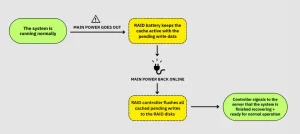
Diagram: A RAID controller with cache battery, showing data flow during normal operation and power failure.
Why Your Business Can’t Afford to Ignore RAID Cache Batteries
1. Preventing Data Loss and Corruption
In 2023, 42% of unplanned downtime resulted from power-related issues (Uptime Institute). Without a BBU:
- Unflushed cache can leave databases in inconsistent states.
- Financial institutions risk transaction rollbacks violating ACID compliance.
Case Study: A European e-commerce platform lost **$2.8 million** during a blackout when its RAID cache lacked battery backup, corrupting order databases.
2. Compliance and Legal Protection
Regulations like GDPR, HIPAA, and PCI-DSS mandate data integrity. BBUs help demonstrate due diligence in safeguarding data.
3. Performance Optimization
With a BBU, administrators can safely enable write-back caching (storing data in cache before disk confirmation), accelerating I/O operations by 30–50%.
Maintenance Best Practices: Extending BBU Lifespan
- Regular Self-Tests: Schedule monthly tests via RAID management tools (e.g., MegaRAID Storage Manager).
- Environmental Control: Keep BBUs at 20–25°C; heat reduces lithium-ion efficiency by 20% per 10°C above 25°C.
- Firmware Updates: Patch vulnerabilities and optimize power algorithms.
- Proactive Replacement: Replace BBUs every 3–5 years or when capacity drops below 80%.
Red Flag: If your BBU’s charge time exceeds 12 hours (from full drain), replace it immediately.
Common Myths Debunked
- “BBUs Are Redundant with UPS Systems”:
Uninterruptible Power Supplies (UPS) protect entire systems but take seconds to engage—too slow to save cache data. BBUs activate instantly. - “Supercapacitors Eliminate Battery Needs”:
While supercapacitors suit short outages, they can’t sustain multi-hour downtimes common in natural disasters. - “All BBUs Are Created Equal”:
Enterprise-grade BBUs (e.g., Dell PowerEdge) offer longer runtime and smarter diagnostics than consumer-grade models.
The Future of RAID Cache Technology
- Solid-State Batteries: Emerging lithium-metal batteries promise 2x the lifespan and faster charging.
- AI-Driven Predictive Maintenance: Machine learning models will forecast BBU failures weeks in advance.
- Integration with Renewable Energy: Solar-charged BBUs for off-grid data centers.
RAID cache batteries are far more than a “nice-to-have”—they’re the silent guardians of data integrity in an unpredictable world. By understanding their role, implementing best practices, and debunking myths, enterprises can avoid costly disasters and maintain seamless operations.
In an age where data is the new currency, investing in RAID cache batteries isn’t just technical prudence; it’s a strategic imperative. Whether you’re managing a cloud cluster or an on-premises SAN, remember: When the lights go out, your BBU is what stands between business-as-usual and catastrophic failure.







Leave a comment