
This article explains common troubleshooting steps when S5700 switch stacking fails to establish. Stacking technology allows multiple switches to operate as a single logical unit, enhancing reliability and scalability. However, misconfiguration or improper cabling can prevent the stack from forming correctly.
1. Check Whether the Devices Support Stacking
- Verify device compatibility.
Run the command display device to view the model. - Verify stack compatibility between devices.
Check the stacking compatibility information in the same document to ensure the selected devices can form a stack.
2. Check Whether the Stacking Function Is Enabled
By default, stacking is enabled. If the display stack command cannot be executed, it means the feature is disabled. Enter the diagnostic view and run stack enable to enable stacking.
3. Check Stacking Cable Connections
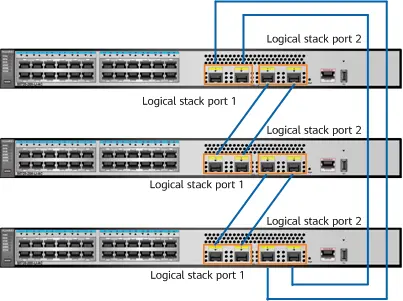
There are two main connection methods: using stacking cards or using service ports.
- Using stacking cards.
The topology can be chain or ring. Connect STACK 1 on one switch to STACK 2 on another.
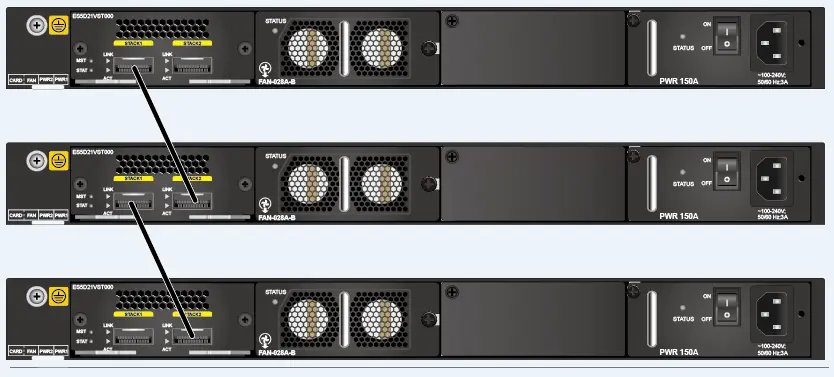
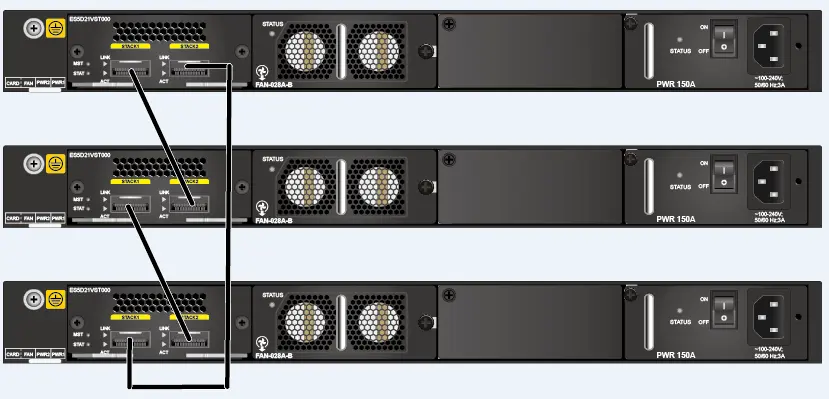
2. Using service ports.
Similar to stacking cards, service port stacking supports chain and ring topologies. Ensure cabling matches the intended configuration.
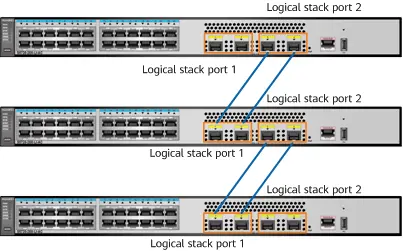
4. Check the Status of Stack Ports
Run display stack port to check stack port configuration (for service port stacking).
<HUAWEI> display stack port brief
PHY     :Physical state
Protocol:Stack link protocol state
*down   :administratively down
(r)     :Runts trigger error down
(c)     :CRC trigger error down
(l)     :Link-flapping trigger error down
(m)     :Media mismatch trigger error down
Stack Port               PHY   Protocol InUti  OutUti    InErrors   OutErrors
-------------------------------------------------------------------------------
stack-port0/1            up     up        0.00%  0.00%     0          0
  XGigabitEthernet0/0/1  up     up        0.00%  0.00%     0          0
  XGigabitEthernet0/0/2  up     up        0.00%  0.00%     0          0
stack-port0/2            up     up        0.00%  0.00%     0          0
  XGigabitEthernet0/0/3  up     up        0.00%  0.00%     0          0
  XGigabitEthernet0/0/4  up     up        0.00%  0.00%     0          0
PHY indicates the physical status of the port. It should show “up”.
Protocol indicates the protocol status. It should also be “up”. If “down”, the stack port has not received stack link packets.


Leave a comment