

Recently, a customer reported that his Huawei router could not run 400G ports. Let’s check that we can how to solve the problem.
Contents
Case Description
Investigation Process
Cause Analysis
Proposed Solution
Case Description
Customer checked the router already have license, when apply port 78 on 400G configuration on license, the 400G port not running.
license
active port-basic slot 1 card 1 port 0-39,56-57
active port-basic slot 1 card 1 port 62,66,70,74,78 400G
active port-core-aggregation slot 1 card 1 port 0-39,56-87
dis int 100GE0/1/78
100GE0/1/78 current state : DOWN(link fault) (ifindex: 29)
Line protocol current state : DOWN
Link quality grade : —
Description:
Route Port,The Maximum Transmit Unit is 1500
Internet protocol processing : disabled
IP Sending Frames’ Format is xxxx, Hardware address is xxxx.
Factor/Module: QSFP-DD, Standard: 400G-LR4-10, FecMode: Standard
The Vendor PN is xxxx
The Vendor Name is Transcom
Port BW: 100G, Transceiver max BW: 400G, Transceiver Mode: SingleMode
Connector Type: LC, Transmission Distance: 10km
Investigation Process
As per checking on the device, we notice that port 78 have a mechanism that it will share a bandwidth of 400G with ports 76, 77 and 79.
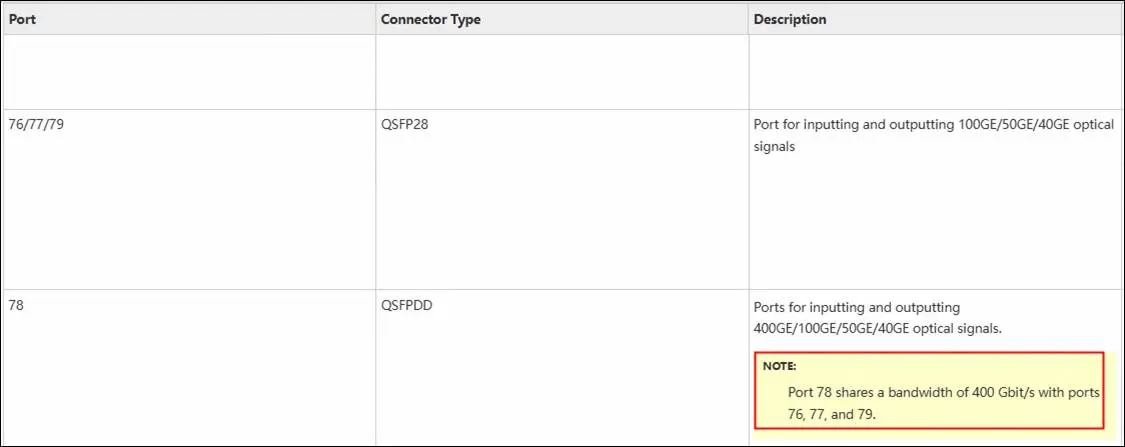
From the logs, we can see that you have activated port basic 400G for port 78, but due to bandwidth sharing mode of port 78, it will become 100G sharing for four interfaces.
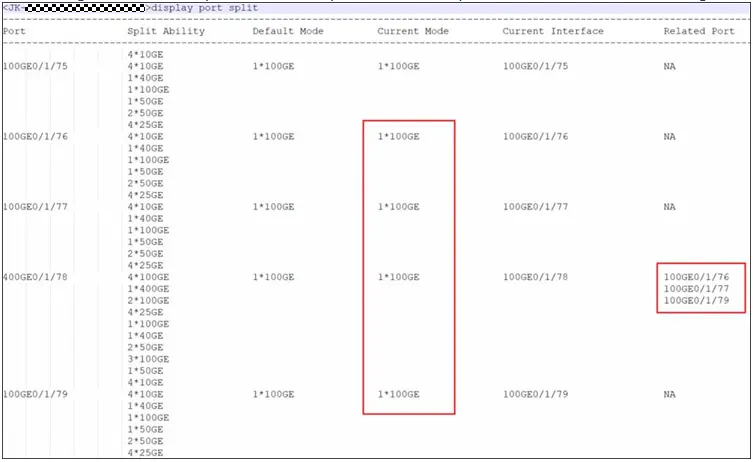
Kindly take note that by performing this command, port 76, 77 and 79 will become 0G.
Cause Analysis
Port 78 have a mechanism that it will share a bandwidth of 400G with ports 76, 77 and 79.
Proposed Solution
If you want the 400G all goes to port 0/1/78, you can execute below command:
<HUAWEI> system-view
[HUAWEI] port split dimension interface 400GE 0/1/78 split-type 1*400GE
This article includes references to publicly available online content for informational purposes only.

Leave a comment