
In an era where hybrid work is the norm, businesses face a critical challenge: enabling employees to work from anywhere without compromising security or productivity. Enter Cisco OfficeExtend, a robust solution designed to extend corporate-grade network security and connectivity to remote workers. Far more than a VPN alternative, OfficeExtend integrates seamlessly with Cisco’s Unified Communications ecosystem, offering a frictionless experience for both IT teams and end-users. This article explores how OfficeExtend works, its unique advantages, and why it’s become a cornerstone of modern enterprise remote work strategies.
The Remote Work Dilemma: Security vs. Flexibility
The shift to remote work has exposed gaps in traditional IT frameworks. Employees demand easy access to corporate resources from home networks, coffee shops, or airports, but legacy VPNs often struggle with:
- Performance bottlenecks: Latency issues during video conferencing or large file transfers.
- Security risks: Unsecured home Wi-Fi networks becoming entry points for breaches.
- Management complexity: Inability to enforce consistent policies across distributed locations.
Cisco OfficeExtend addresses these challenges by transforming home routers into secure extensions of the corporate network.
How Cisco OfficeExtend Works: Bridging the Office-Home Divide
OfficeExtend operates through a combination of hardware and software:
- Cisco Wireless Access Points (APs): Deployed at employees’ homes, these APs establish an encrypted tunnel to the corporate network using IPSec or SSL VPN.
- Unified Communications Integration: Integrates with Cisco Unified Communications Manager (CUCM) and Webex, ensuring seamless call routing and messaging.
- Centralized Management: IT admins configure and monitor all remote APs via Cisco DNA Center, enforcing policies like QoS, bandwidth limits, and device whitelisting.
Key Features:
- Zero-Touch Deployment: Employees plug in the AP, and it auto-configures via the cloud.
- Dual SSIDs: Separate networks for corporate devices and personal gadgets, isolating sensitive traffic.
- Encrypted Backhaul: All data traversing the home network is encrypted end-to-end.
Why OfficeExtend Outperforms Traditional VPNs
While VPNs remain popular, OfficeExtend offers distinct advantages:
| Aspect | Cisco OfficeExtend | Standard VPN |
|---|---|---|
| Performance | Dedicated bandwidth for UC apps | Shared bandwidth, prone to lag |
| Security | Hardware-level encryption, isolated SSID | Software-based, vulnerable to leaks |
| User Experience | Automatic connection, no manual logins | Frequent re-authentication |
| IT Control | Centralized policy management | Limited device-level controls |
Case Study: A financial services firm reduced helpdesk tickets by 60% after switching to OfficeExtend, as employees no longer struggled with VPN drops during trading hours.
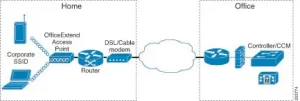
Diagram: Cisco OfficeExtend setup showing encrypted tunnels between home APs and corporate data centers, with dual SSID segmentation.
Real-World Applications: Industries Transformed by OfficeExtend
1. Healthcare: Secure Access to Patient Records
A hospital network deployed OfficeExtend APs to allow doctors to securely access EHR systems from home. Features like HIPAA-compliant encryption and role-based access control ensured compliance, while QoS prioritized telehealth video calls.
Result: Reduced on-call response times by 45% and eliminated data breaches from home networks.
2. Education: Enabling Remote Learning
A university used OfficeExtend to provide faculty with reliable access to research databases and virtual labs. The solution’s bandwidth throttling prevented household streaming from disrupting academic tools.
Impact: Faculty reported a 30% increase in productivity during remote semesters.
3. Manufacturing: Connecting Field Engineers
Field technicians at an automotive company use OfficeExtend-enabled tablets to securely access CAD files and machine diagnostics from repair sites.
Outcome: Reduced equipment downtime by 25% through real-time collaboration with HQ engineers.
Overcoming Deployment Challenges
While powerful, OfficeExtend requires careful planning:
- Hardware Costs: Providing APs to all remote employees can be expensive. Mitigate this via phased rollouts or “BYOAP” models for tech-savvy staff.
- Network Compatibility: Ensure corporate firewalls and SD-WAN solutions (e.g., Cisco Meraki) support OfficeExtend protocols.
- User Training: Simplify adoption with video guides highlighting plug-and-play setup.
Pro Tip: Use Cisco’s AP Predictive Planner tool to simulate home network performance before deployment.
The Future of Remote Work with Cisco
Cisco is enhancing OfficeExtend with:
- AI-Driven Anomaly Detection: Machine learning identifies suspicious traffic patterns from home networks.
- 5G Integration: Leveraging cellular networks for backup connectivity in areas with poor broadband.
- IoT Device Support: Securely connecting smart home devices (e.g., security cameras) to corporate monitoring systems.
Cisco OfficeExtend isn’t just a tool—it’s a strategic enabler of the modern workplace. By merging enterprise-grade security with effortless usability, it empowers organizations to embrace remote work without sacrificing control or performance.
For businesses navigating the hybrid work era, the question isn’t whether to invest in solutions like OfficeExtend, but how quickly they can deploy them. In a world where talent is global and threats are omnipresent, OfficeExtend offers the blueprint for secure, scalable, and sustainable remote operations.

Leave a comment